Monday, August 22, 2011

Plotting a Complex Exponential

We rewrote one of the MIT OCW 18.03 ODE Mathlets in Python. This mathlet was for plotting complex exponentials.
from pylab import *

from matplotlib.widgets import Slider

ax = subplot(121)
subplots_adjust(left=0.1, bottom=0.25)
l1, = plot(None,None, lw=2, color='red')
axis([-1, 1, -8, 8])
title ('$(a + bi)t$', color='blue')
grid()

ax = subplot(122)
subplots_adjust(left=0.1, bottom=0.25)
l2, = plot(None,None, lw=2, color='red')
axis([-3, 3, -3, 3])
title ('$e^{(a + bi)t}$', color='blue')
grid()

axcolor = 'lightgoldenrodyellow'
axa = axes([0.15, 0.1, 0.65, 0.03], axisbg=axcolor)
axb = axes([0.15, 0.15, 0.65, 0.03], axisbg=axcolor)

slidera = Slider(axa, 'a', -1.0, 1.0, valinit=0)
sliderb = Slider(axb, 'b', -8.0, 8.0, valinit=0)

def update(val):
a = slidera.val
b = sliderb.val
t = arange(-1.0, 1.0, 0.001)
l1.set_xdata(t)
l1.set_ydata((b/a)*t)

t = arange(-3.0, 3.0, 0.001)
l2.set_xdata(exp(a*t)*cos(b*t))
l2.set_ydata(exp(a*t)*sin(b*t))
draw()

slidera.on_changed(update)
sliderb.on_changed(update)

show()


Saturday, July 23, 2011

Clustering, Image Segmentation, Eigenvectors and Python

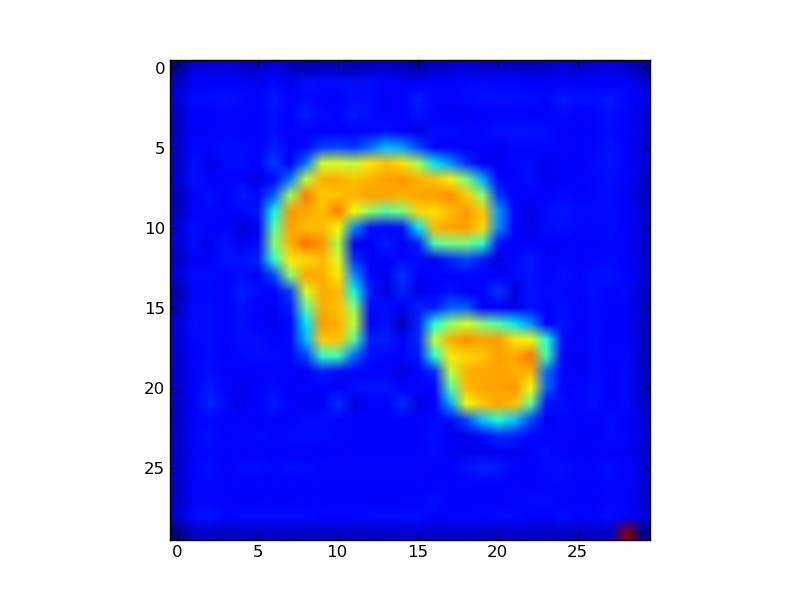
Here is example code for eigenvector based segmentation in Python. For more details, see code here.
import matplotlib.pyplot as plt
import numpy as np

Img = plt.imread("twoObj.jpg")
n = Img.shape[0]
Img2 = Img.flatten(order='C')
nn = Img2.shape[0]

A = np.zeros((nn,nn))

for i in range(nn):
 for j in range(nn):
     A[i,j]=np.exp(-((Img2[i]-Img2[j])**2))

V,D = np.linalg.eig(A)
V = np.real(V)
a = np.real(D[0])
print a

threshold = 0 # filter
a = np.reshape(a, (n,n))
Img[a<threshold] = 255
plt.imshow(Img)
plt.show()


Saturday, April 9, 2011

Myers-Briggs Test in Javascript / Python

Hunch.com apparently uses this method - Myers-Briggs Test is a psychology, profile evaluation system, expanded upon later by David Keirsey. We coded the evaluation scheme in Python, making a few additions. In the original version in David Keirsey book Please Understand Me II, the answer to each question is either A, or B, these choices in Python code as -1, +1 then sum up appropiate array values. Recent versions of this questionaire carry more (sometimes even five) choices. We noticed an additional 'neutral' choice can made an improvement, our version carries 3 answers. Eval code substitutes -1 for A, +1 for B, and 0 for neutral.

An example of the evaluation algorithm Keirsey uses in his book is above. We simply generate indexes that correspond to the columns seen above (answers arrive in a straight list, numbered from 1 to 70), then do the addition.
def calculate_mb(choices):

  new_choices = []

  for i in range(1,8):
      new_choices.append([int(choices[j-1]) for j in range(i,71,7) ])

      res = list("XXXX")

  ei = sum(new_choices[0])
  if ei < 0: res[0] = 'E'
  else: res[0] = 'I'

  sn = sum(new_choices[1]) + sum(new_choices[2])
  if sn < 0: res[1] = 'S'
  else: res[1] = 'N'

  tf = sum(new_choices[3]) + sum(new_choices[4])
  if tf < 0: res[2] = 'T'
  else: res[2] = 'F'

  jp = sum(new_choices[5]) + sum(new_choices[6])
  if jp < 0: res[3] = 'J'
  else: res[3] = 'P'

  logging.debug(choices)

  return str(''.join(res))

Another version, in HTML using Javascript, can be found here.

Monday, March 21, 2011

ARIMA, Forecasting and Python

I ported the R code found on Rob Hyndman's blog into Python + rpy2. The latter package allows calling of R code from Python which we used here to utilize the forecast package. Test R and Python codes can also be found in the zip file below.
import rpy2.robjects as R
import rpy2.rinterface as rinterface
from rpy2.robjects.packages import importr
import rpy2.robjects.numpy2ri
from rpy2.robjects.vectors import FloatVector, StrVector
import datetime
import numpy as np
forecast = importr("forecast")
R.r.source("arima-fn.R")

x = np.loadtxt("garan.dat",  skiprows=1)
n = len(x)
m = 10
terms = 4

x = np.insert(x, 10, np.nan) # put in a NaN to see what happens
n += 1

print x

R.r.assign('x',x)
R.r.assign('n',n)
R.r.assign('m',m)
R.r.assign('terms',terms)

R.r('fit = Arima(x=x, order=c(2,0,1), xreg=fourier(1:n,terms,m))')
R.r('f = forecast(fit, h=2*m, xreg=fourier(n+1:(2*m),terms,m))')
res = R.r('forecast_results(f)')
for x in res:
  print x

All Code

arima-fourier2.R

forecast_results <- function(res)
{
  return (res$mean)
}

fourier <- function(t,terms,period)
{
  print (terms)
  n <- length(t)
  X <- matrix(,nrow=n,ncol=2*terms)
  for(i in 1:terms)
  {
    X[,2*i-1] <- sin(2*pi*i*t/period)
    X[,2*i] <- cos(2*pi*i*t/period)
  }
  colnames(X) <- paste(c("S","C"),rep(1:terms,rep(2,terms)),sep="")
  return(X)
}

library(forecast)

yy <- read.table ("garan.dat", header=T)
y <- yy[,'price']

n <- length(y)
print (n)
m <- 10 # how many points in the future
terms = 4

fit <- Arima(y, order=c(2,0,1), xreg=fourier(1:n,terms,m))

f = forecast(fit, h=2*m, xreg=fourier(n+1:(2*m),terms,m))

print (forecast_results(f))

plot(f)

arima-fouerier.R

n <- 2000
m <- 200
y <- ts(rnorm(n) + (1:n)%%100/30, f=m)
print (y)
quit()
fourier <- function(t,terms,period)
{
  n <- length(t)
  X <- matrix(,nrow=n,ncol=2*terms)
  for(i in 1:terms)
  {
    X[,2*i-1] <- sin(2*pi*i*t/period)
    X[,2*i] <- cos(2*pi*i*t/period)
  }
  colnames(X) <- paste(c("S","C"),rep(1:terms,rep(2,terms)),sep="")
  return(X)
}

library(forecast)
fit <- Arima(y, order=c(2,0,1), xreg=fourier(1:n,4,m))
f = forecast(fit, h=2*m, xreg=fourier(n+1:(2*m),4,m))
plot(f)

print (y)
print (f)

arima.py

import rpy2.robjects as R
import rpy2.rinterface as rinterface
from rpy2.robjects.packages import importr
import rpy2.robjects.numpy2ri
from rpy2.robjects.vectors import FloatVector, StrVector
import datetime
import numpy as np
forecast = importr("forecast")
R.r.source("arima-fn.R")

x = np.loadtxt("garan.dat",  skiprows=1)
n = len(x)
m = 10
terms = 4

x = np.insert(x, 10, np.nan) # put in a NaN to see what happens
n += 1

print x

R.r.assign('x',x)
R.r.assign('n',n)
R.r.assign('m',m)
R.r.assign('terms',terms)

R.r('fit = Arima(x=x, order=c(2,0,1), xreg=fourier(1:n,terms,m))')
R.r('f = forecast(fit, h=2*m, xreg=fourier(n+1:(2*m),terms,m))')
res = R.r('forecast_results(f)')
for x in res:
    print x

garan.dat

price
6.40000
6.33000
6.43000
6.53000
6.48000
6.33000
6.28000
6.33000
6.33000
6.18000
6.28000
6.28000
6.43000
6.48000
6.23000
6.38000
6.33000
6.23000
6.45000
6.28000
6.38000
6.43000
6.45000
6.23000
6.04000
5.84000
5.94000
5.84000
5.95000
5.89000
5.94000
6.00000
6.35000
6.13000
6.38000
6.23000
6.04000
5.79000
5.49000
5.70000